
Settings, notifications and billing
Account settings, notification preferences, payments, plans, seats and included usage.
Settings
Settings gathers everything about your account: profile texts, email and password, connected accounts, logged devices, notification preferences, API keys and webhooks. In an academy context the same page shows the academy settings instead.
Notifications
Choose channel by channel what reaches you: in-app, browser push and email. Course rooms, mentions, replies to your posts, live lesson reminders and payments each have their own switch.
Billing
- Students see purchases, invoices and saved payment methods.
- Teachers and academies see sales and payouts. Payouts follow the Stripe schedule of your country.
Plans and seats
The plan belongs to the workspace and buys its capabilities: catalog, feed, calendar, exams, certificates, ARIA. The product is the same from Solo to Enterprise; seats, branding, domain and usage change. Prices and the calculator are on aladia.io/pricing.
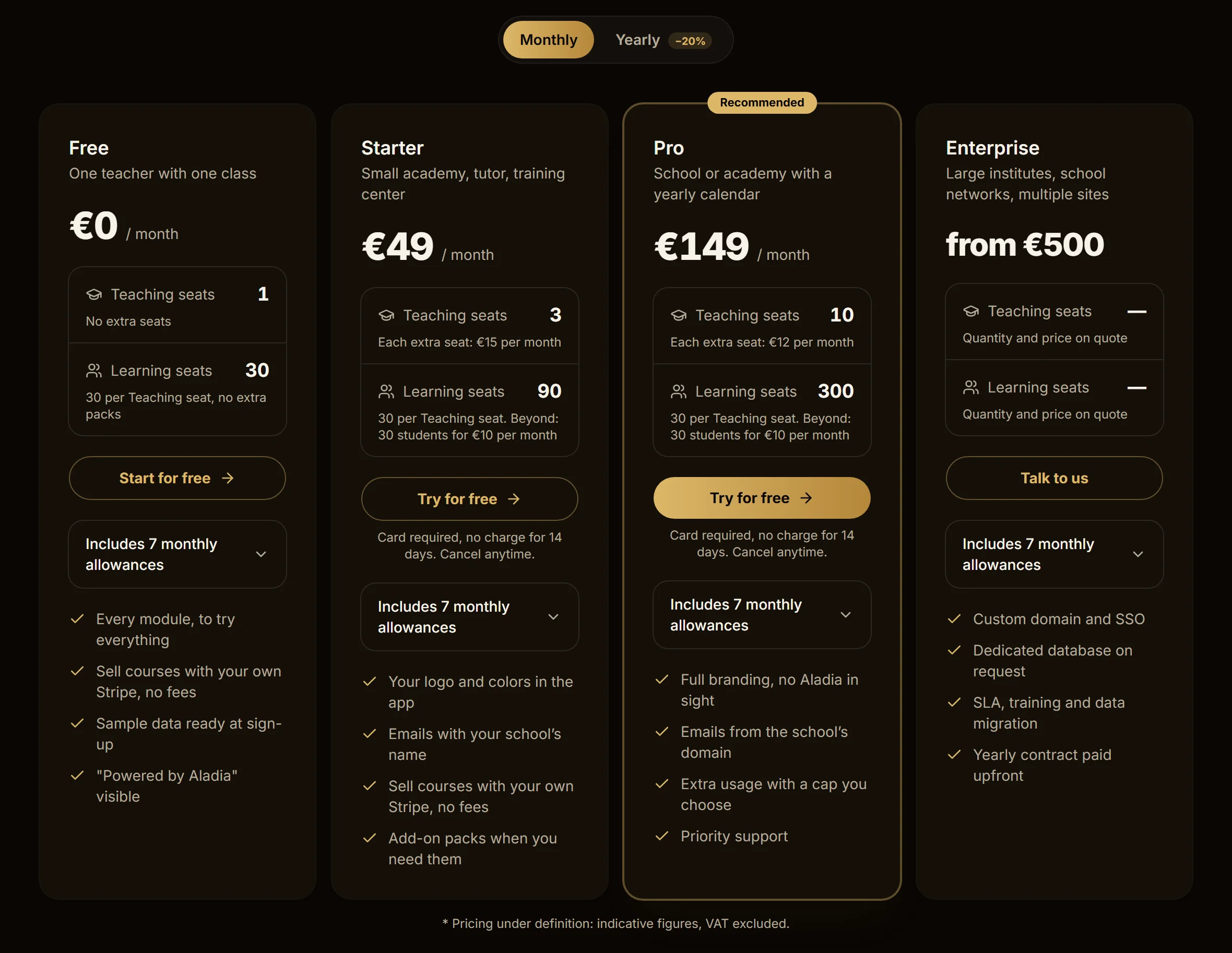
| Plan | Price | Teaching seats included | Learning seats |
|---|---|---|---|
| Solo | €29 / month or €276 / year | 1, no extra seats | 30, no extra packs |
| Team | €79 / month or €756 / year | 3, each extra seat €15 per month | 30 per Teaching seat, then 30 students for €10 per month |
| Organization | €199 / month or €1,908 / year | 10, each extra seat €12 per month | 30 per Teaching seat, then 30 students for €10 per month |
| Enterprise | from €500 | quantity and price on quote | quantity and price on quote |
With yearly billing you pay the year upfront with 20% off the plan, seats and packs. Prices are indicative and VAT excluded while the price list is being defined.
Who takes a seat
A workspace has four kinds of people. Only one is paid.
- Teaching: Owner, Admin, Editor and Teacher. These are the only paid seats.
- Learning: the students you assign. Each Teaching seat adds 30 to the shared pool of the workspace; beyond that, packs of 30 students for €10 per month.
- Customers: people who buy a course of €10 or more through Aladia's checkout, with your Stripe. They take no seat. Free enrollments and enrollments coming through the API count as assigned students.
- Readers: parents, reviewers and read-only guests. Always free.
A seat is taken when you assign someone and freed when you remove them. Going over your seats blocks nothing: one more teacher adds a Teaching seat, going over the student pool adds a pack of 30, and you only pay for the days left until renewal.
Selling courses
On every plan, Solo included, you sell with your own Stripe account connected from Integrations: you collect, you invoice, you decide refunds. Aladia takes no fee on course sales and only earns from the plan.
Included usage and AI credits
Every plan includes, each month, live participant minutes, recordings with transcript, storage, video viewing, AI credits and emails. On the pricing page they are under Includes 7 monthly allowances in each plan.
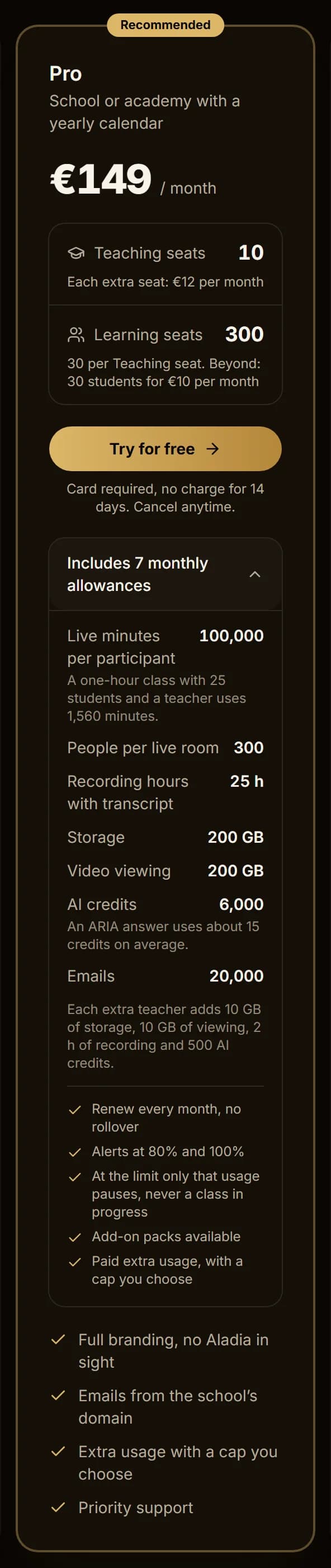
| Monthly allowance | Solo | Team | Organization | Enterprise |
|---|---|---|---|---|
| Live participant minutes | 30,000 | 100,000 | 300,000 | Custom |
| People per live room | 25 | 100 | 300 | Custom |
| Recording hours with transcript | 30 h | 100 h | 300 h | Custom |
| Storage | 20 GB | 100 GB | 500 GB | Custom |
| Video viewing | 50 GB | 250 GB | 1 TB | Custom |
| AI credits | 1,000 | 2,000 | 6,000 | Custom |
| Emails | 1,000 | 5,000 | 20,000 | Custom |
Participant minutes are counted per person: each person connected counts their own minutes, so 1 hour with 25 people makes 1,500 minutes. Each extra teacher adds, on Team, 20 GB of storage, 20 GB of viewing, 10 h of recording and 500 AI credits; on Organization, 30 GB of storage, 30 GB of viewing, 10 h of recording and 500 AI credits. On Enterprise usage is agreed in the contract.
- Allowances renew every month, with no rollover.
- You are alerted at 80% and 100%.
- At the limit only that usage pauses, never a class in progress.
- Add-on packs are available; on Solo you move to Team.
- On Organization and Enterprise you can turn on paid extra usage, with a euro cap you choose.
AI credits. AI is counted in credits, not tokens: one credit is about 1,000 tokens and an ARIA answer uses about 15 credits on average.
Free trial
Every new workspace tries Organization free for 14 days, with no card needed for the 14 days; cancel before and you pay nothing. At the end choose a plan and add a card, otherwise the workspace is paused (staff read-only, students keep access for 7 days; data is never deleted). One trial per workspace.
Managing the plan from the app is coming soon.
Changelog
Changelog in the sidebar lists what changed in the product, release by release. The same entries feed the "What's new" badge.